

EasyDraw EBB Control Board – Pen Plotter Controller

Original price was: ₹2,500.00.₹1,700.00Current price is: ₹1,700.00. (inc GST)
- EiBotBoard (EBB) compatible – EBB firmware v3.0.3
- Works with Inkscape + AxiDraw extension
- Fits EasyDraw V3 and V4, and DIY CoreXY / Cartesian plotters
- 12–24 V input, sockets for A4988 / TMC2208 / TMC2209
- Stepper drivers not included
- Delivery in 5–8 working days across India · COD available
The EasyDraw EBB Control Board is a USB pen plotter controller based on the open-source EiBotBoard (EBB) design. It runs EBB firmware v3.0.3 and works with Inkscape and the AxiDraw extension, so you can plot drawings, handwriting and SVG artwork straight from your computer. No coding needed.
We design and make it in India for our own EasyDraw V3 and EasyDraw V4 pen plotters. It is also a ready-made controller for DIY CoreXY and Cartesian (X/Y) plotter builds. Two removable driver sockets let you use A4988 drivers, or TMC2208 / TMC2209 for near-silent plotting.
Note: stepper drivers are not included.
Ordering from outside India? Please buy from our international store: EasyDraw EBB Control Board on makerq.com.
Key features
- EiBotBoard (EBB) compatible, running EBB firmware v3.0.3
- Compatible with AxiDraw software: Inkscape 1.x + AxiDraw extension
- 2 removable StepStick driver sockets: A4988, TMC2208 or TMC2209
- Near-silent plotting with TMC2208 / TMC2209 drivers
- 12–24 V DC input
- 5 V servo output for pen lift
- Pause and reset buttons
- Firmware updates over USB, no programmer needed
- Compact 54 × 48 mm board
Specifications
| Microcontroller | PIC18F46J50 |
| Firmware | EBB (EiBotBoard) firmware v3.0.3, updatable over USB |
| Stepper drivers | 2 × StepStick sockets for A4988, TMC2208, TMC2209 (not included) |
| Microstepping | 1/16 (High resolution) or 1/8 (Low resolution), set in software |
| Stepper motors | 2 × NEMA 17 bipolar |
| Motor connectors | JST-XH 4-pin |
| Pen-lift output | 1 × servo port, 5 V |
| Input voltage | 12–24 V DC (use 12 V 2 A or 24 V 3 A adapter) |
| Power connector | DC barrel jack, 5.5 × 2.1 mm |
| USB | USB Type-B |
| Buttons | Pause, Reset |
| Machine types | CoreXY, Cartesian (X/Y) |
| Software | Inkscape 1.x + AxiDraw extension |
| Computers | Windows 10 / 11, macOS (latest) |
| Board size | 54 × 48 mm |
| Weight | 25 g (80 g packed) |
| Made in | India |
Compatibility
- Software: Inkscape 1.x with the AxiDraw extension
- Computers: Windows 10 / 11 and macOS
- Machines: EasyDraw V4, EasyDraw V3, and DIY CoreXY or Cartesian pen plotters with 2 × NEMA 17 motors and a 5 V servo pen lift
Wiring
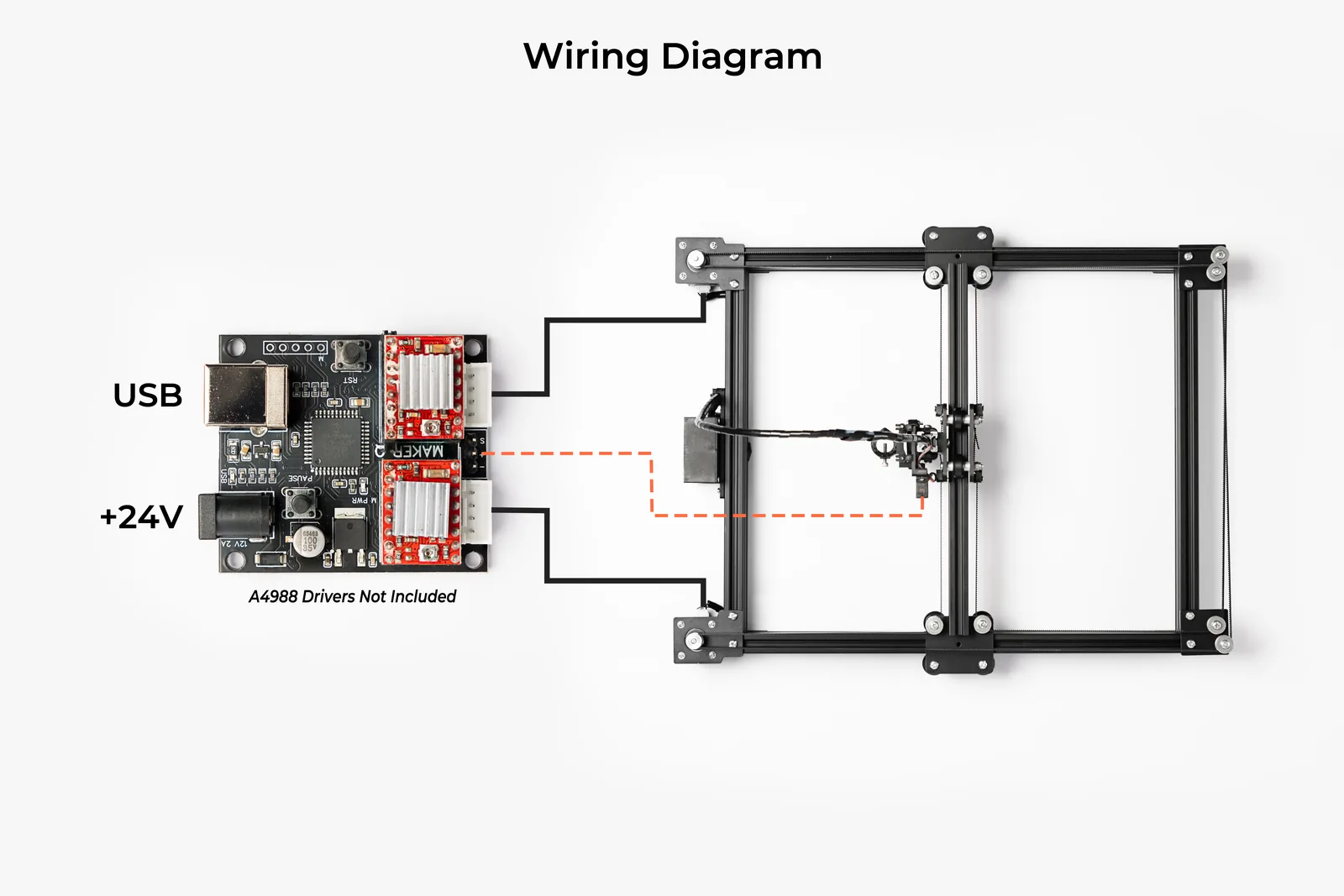
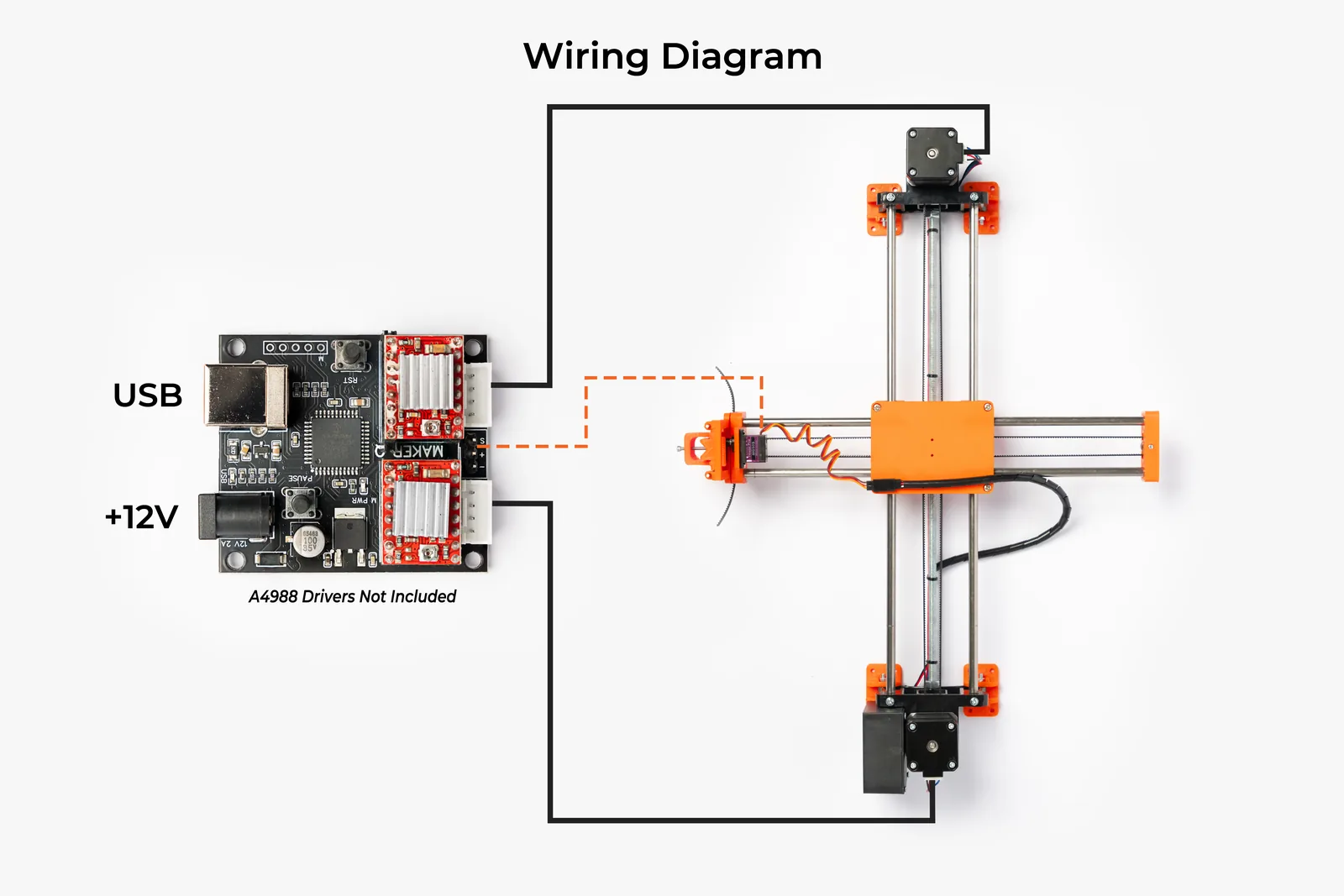
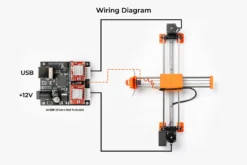
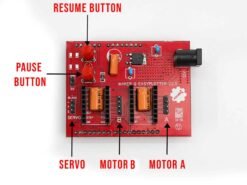
The product photos include wiring diagrams for EasyDraw V3 (12 V) and EasyDraw V4 (24 V). Connect the USB port to your computer, the power adapter to the barrel jack, the two stepper motors to the JST-XH ports, and the pen-lift servo to the 3-pin S / + / − header.
Control board manufacturing video
Stepper driver compatibility
This board has removable driver sockets (standard StepStick footprint), so you can choose the driver that suits you.
Supply voltage: 12 V – 24 V DC. All drivers below are rated for both voltages.
| Driver | Plug & play? | Resolution setting | Notes |
|---|---|---|---|
| A4988 | ✅ Yes | High or Low | Works in both modes |
| TMC2208 | ✅ Yes | High (default) | Near-silent, smoothest motion |
| TMC2209 | ✅ Yes | High (default) | Near-silent (see note) |
⚠️ TMC2208 / TMC2209 users: keep Resolution on High. On Low, drawings come out half size.
TMC2209 note: on some TMC2209 brands, the board puts the driver in the slightly louder spreadCycle mode. It still draws correctly.
Resolution setting
High is the default, so most users don’t need to change anything. If the setting was changed earlier, set it back:
In Inkscape:
- Go to Extensions → AxiDraw Control.
- Open the Options tab.
- Set Resolution to High.
- Inkscape remembers the setting for future plots.
Command line / Python users: in axidraw_conf.py, set resolution = 1.
Setting the driver current (Vref)
Vref is a small voltage on the driver’s potentiometer that sets how much current the motor gets.
✅ Use the same Vref at 12 V and 24 V.
Step 1: find your driver’s formula. Check the tiny sense resistor printed near the driver chip.
| Driver | Sense resistor marking | Vref formula |
|---|---|---|
| A4988 | R100 | Vref = Motor current × 0.8 |
| A4988 | R068 | Vref = Motor current × 0.54 |
| TMC2208 / TMC2209 | R110 | Vref = Motor current × 1.0 |
Step 2: quick reference (Vref in volts)
| Motor current | A4988 (R100) | A4988 (R068) | TMC2208 / 2209 |
|---|---|---|---|
| 0.8 A | 0.64 V | 0.44 V | 0.80 V |
| 1.0 A | 0.80 V | 0.54 V | 1.00 V |
| 1.2 A | 0.96 V | 0.65 V | 1.20 V |
| 1.5 A | 1.20 V | 0.82 V | 1.50 V |
Use your motor’s rated current or a little less. Pen plotters need very little force, so 70–80% of the rated current is plenty and keeps the motors and drivers cooler.
Step 3: measure and adjust
- Power the board at 12 V or 24 V.
- Set your multimeter to DC volts. Put the black probe on GND and the red probe on the potentiometer’s metal top.
- Turn the potentiometer slowly with a plastic or ceramic screwdriver and re-measure until you reach the target value.
Safety tips
- ⚠️ Always switch off power before inserting or removing a driver.
- ⚠️ Never unplug a motor while powered. It can destroy the driver.
- Match the EN pin on the driver to the EN marking on the board. Some TMC modules face the opposite way from A4988 modules.
- Fit the heatsinks. Above about 1 A, add a small fan.
- If a motor runs backwards after switching drivers (the drawing comes out mirrored), reverse that motor’s plug or swap the two wires of one coil.
What’s in the box
- 1 × EasyDraw EBB Control Board
Stepper drivers, motors, servo, USB cable and power adapter are not included.
Delivery, payment and testing
- Price: includes GST
- Delivery: 5–8 working days anywhere in India
- Cash on Delivery: available. Pay ₹300 in advance online and the balance on delivery.
- Tested before shipping: every board is tested before it is shipped.
- Shipping damage: if the board arrives damaged in shipping, we will replace it.
- No warranty: there is no warranty other than replacement for shipping damage.
- Bulk orders: call or WhatsApp +91 8590094244
- International orders: please order from makerq.com.
FAQ
Does it work with AxiDraw software?
Yes. It works with Inkscape 1.x and the AxiDraw extension on Windows 10 / 11 and macOS.
Are stepper drivers included?
No. Fit two A4988, TMC2208 or TMC2209 drivers (StepStick type).
Which power supply do I need?
A 12 V 2 A or 24 V 3 A DC adapter with a 5.5 × 2.1 mm barrel plug.
Can I update the firmware?
Yes, over USB. No PICkit or other programmer is needed.
Will it work with my DIY plotter?
Yes, if your plotter is CoreXY or Cartesian (X/Y) and uses two NEMA 17 stepper motors and a 5 V servo for pen lift.
How can I make my plotter quieter?
Use TMC2208 or TMC2209 drivers and keep Resolution on High.
Is Cash on Delivery available?
Yes. Pay ₹300 in advance online and the rest in cash when the parcel arrives.
How long does delivery take?
5–8 working days anywhere in India.
Is there a warranty?
No. Every board is tested before shipping. If it arrives damaged in shipping, we will replace it.
Do you ship outside India?
For international orders, please order from makerq.com.
11 reviews for EasyDraw EBB Control Board – Pen Plotter Controller
Only logged in customers who have purchased this product may leave a review.
Related products
Sharry Turna –
Looking good
RABINDRANATH BARMAN –
Good quality. The thing is very good but the problem is wire connection
Rahul C –
okay
Nahid Reza –
Good quality.
SHYAMLAL C P –
Best Product
Chanchal Sakarde –
Very good product build, guide on YouTube is very clearly explained and most pormpt supportive saller.
Keep it up and best wishes for .. “Make In India”
sagar barua –
good
Abhishek Palankar –
Good quality great work
Chetan S –
have to order twice first got usb malfunction.
Abhishek Palankar –
Bhargob Sharma –
Works fine, thanks